Mounts Plus Add-On
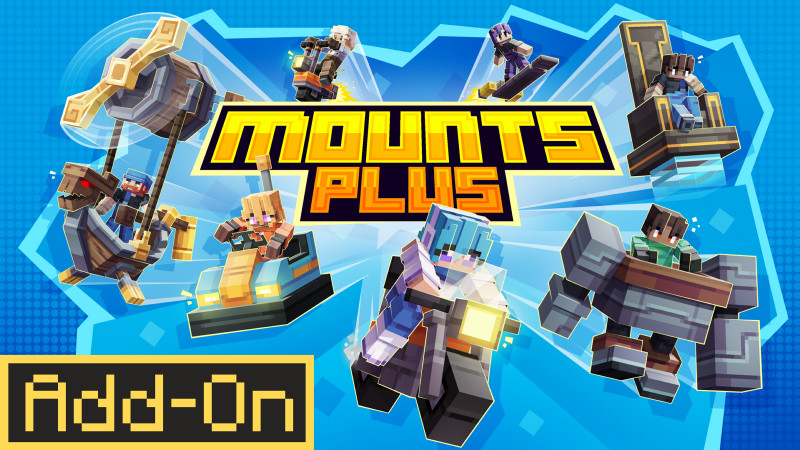
Mounts Plus introduces unique vehicles with exciting abilities and practical mechanics for survival adventures!
Discover customizable transports, exotic rides, and special machines to explore the world.
- Unique machines with special abilities
- Flying, combat, and support mechanics
- Vehicle customization system
- Licensed by Nix Studios and published by BLOCKLAB Studios.
Screenshots


Details
Minimum Version: 1.26.60
Launched:
Updated:
3 Ratings
(Minecraft Store)
5/5


Product Details:
BLOCKLAB Studios presents Mounts Plus Add-On: Mounts Plus introduces unique vehicles with exciting abilities and practical mechanics for survival adventures! Discover customizable transports, exotic rides, and special machines to explore the world. Unique machines with special abilities, Flying, combat, and support mechanics, Vehicle customization system, Licensed by Nix Studios and published by BLOCKLAB Studios.
Mounts Plus Add-On is a Minecraft Bedrock Marketplace Add-On (DLC) that can be purchased in Minecraft for 660 Minecoins. Mounts Plus Add-On is not free to download, you should respect the creator and buy this Add-On in Minecraft Bedrock if you like it. 660 Minecoins are roughly equivalent to 3.46$ (USD) or 3.26€ (EURO). This value may vary depending on the currency and country. This information is without guarantee. This Add-On was created by BLOCKLAB Studios and has been available since Tuesday, November 24, 2026. Mounts Plus Add-On was last updated on Tuesday, November 24, 2026 and is compatible with Minecraft Bedrock version 1.26.60 and newer versions.
Product Rating:
With an average rating of 5 out of 5 stars, Mounts Plus Add-On is a very popular Add-On on the Minecraft Bedrock Marketplace and is well received by the community.
Additional Information:
Mounts Plus Add-On includes no additional Minecraft Bedrock skins.
Product Tags:
- Boat
- Cars
- Magic
- Mechs
- Motorcycles
- Vehicles
- Character Customization
Support and information for parents:
This Add-On is part of the Minecraft Marketplace and can be purchased through the Minecraft Bedrock Marketplace. Chunk only provides the same information as the Minecraft Marketplace and does not sell it. If you have any questions about this product, please contact the creator directly. (BLOCKLAB Studios) For more information on parental controls, please visit the official Minecraft website. Just click this link for more details.
Product Metadata:
The official Minecraft Marketplace UID for this product is a7beddab-3197-4c99-ae09-688958e3846b. If you have Minecraft Bedrock installed, you can open this product using this link.
Redirecting to Marketplace...
If Minecraft has opened, you can safely close this modal. If not try again with the button below. If it still not working, your browser does not support external links or you do not have Minecraft Bedrock installed. Try opening this page on a device with Minecraft Bedrock installed.
Scan the code to get it on your phone